Start with the experience you want to improve
Your website may look dated, your app may be difficult to navigate, or your first AI-generated interface may feel generic. The useful starting point is the task people need to complete: understand the offer, request a quote, find a record, or finish a booking.
NexSolvo uses AI tools to help explore designs and redesigns for apps and websites. Joe brings product, UX/UI, and software development experience to reviewing those directions and turning a selected approach into a usable interface.
That can mean a new design, a focused improvement to an existing screen, or a broader redesign. The scope should follow the problem and the systems already in place.
Where this approach fits
A website that undersells the business
Clarify the message, establish a visual hierarchy, and make the next action easier to find. Use your real services, customer questions, and brand assets.
An app with too much friction
Rework navigation, dense forms, dashboards, and status displays around the tasks users perform most often.
An idea that needs a visible direction
Explore screen layouts and a key user flow before committing to full implementation. Use the result to gather specific feedback.
An AI-built interface that needs refinement
Bring consistency to typography, spacing, components, content, and interaction states while checking how the interface behaves.
From a design brief to a working interface
- Understand the current experience. Identify the audience, key task, existing pain points, and what already works. Review available feedback and analytics without assuming a visual refresh will fix every problem.
- Set the design direction. Gather brand assets, useful references, content, and constraints. Decide which screens or pages belong in the first phase.
- Explore with AI assistance. Use tools to generate and revise layout directions, content hierarchy, or interface drafts. Evaluate each option against the brief.
- Refine the selected approach. Check typography, spacing, contrast, navigation, and consistency. Design mobile layouts and the empty, loading, error, and success states the workflow needs.
- Build or hand off the agreed result. Depending on scope, deliver design guidance, a clickable prototype, or implemented pages and components with a clear account of what is connected.
- Verify the experience. Walk through the main task on desktop and mobile, check keyboard interaction and form feedback, and collect user feedback where practical.
AI helps produce options and revisions. The decisions about which direction fits your business, how it behaves, and what to ship remain part of the design and engineering work.
Example: make a quote request easier
Illustrative redesign brief: a local service business has a long homepage, several equally prominent buttons, and a contact form that leaves staff asking the same follow-up questions.
Current experience
- The offer and service area are buried.
- Visitors cannot tell which action to take.
- The form asks for a message but misses key project details.
- Submission feedback does not explain what happens next.
Proposed direction
- Lead with the service, audience, and location.
- Use one primary quote-request action.
- Ask for the few details needed to respond usefully.
- Show a clear confirmation and an accurate next step.
AI can help explore the layout. The business decides which questions matter and what response expectations it can meet. Implementation connects the form and handles validation and failed submissions.
After launch, compare completion rates, incomplete inquiries, and customer feedback with the previous experience. This example describes a design hypothesis, not a claimed conversion improvement.
Choose the deliverable you actually need
Design direction
An agreed visual approach and prioritized recommendations for selected pages or screens. Define the file format and revision scope before work begins.
Interactive prototype
A navigable demonstration of a key journey for feedback. Specify which interactions are simulated and which use working services.
Implemented redesign
Updated pages or components integrated into the agreed codebase, with responsive behavior and checks on the selected workflows.
Reusable interface patterns
When useful, establish shared typography, colors, spacing, and components so later screens follow a consistent approach.
Plan the redesign around what already works
A redesign can improve the interface while preserving valuable content and familiar workflows. Inventory existing URLs, forms, analytics, integrations, and account flows before deciding what changes.
For a website, include a redirect plan if URLs change and check titles, headings, internal links, and the contact path. For an app, identify permissions and business rules behind each screen so visual changes preserve the intended behavior.
Cost and timing depend on the number of layouts, content readiness, revision scope, existing code, and integrations. Start with one important page or user journey when the broader direction is uncertain.
Design judgment with implementation experience
Podcast Player: AI-assisted redesign exploration
Podcast Player is a beta tool in the mytoolvault project, already included in NexSolvo’s project portfolio. Its redesign work used AI-generated boards to explore desktop and mobile layouts in both light and dark themes.
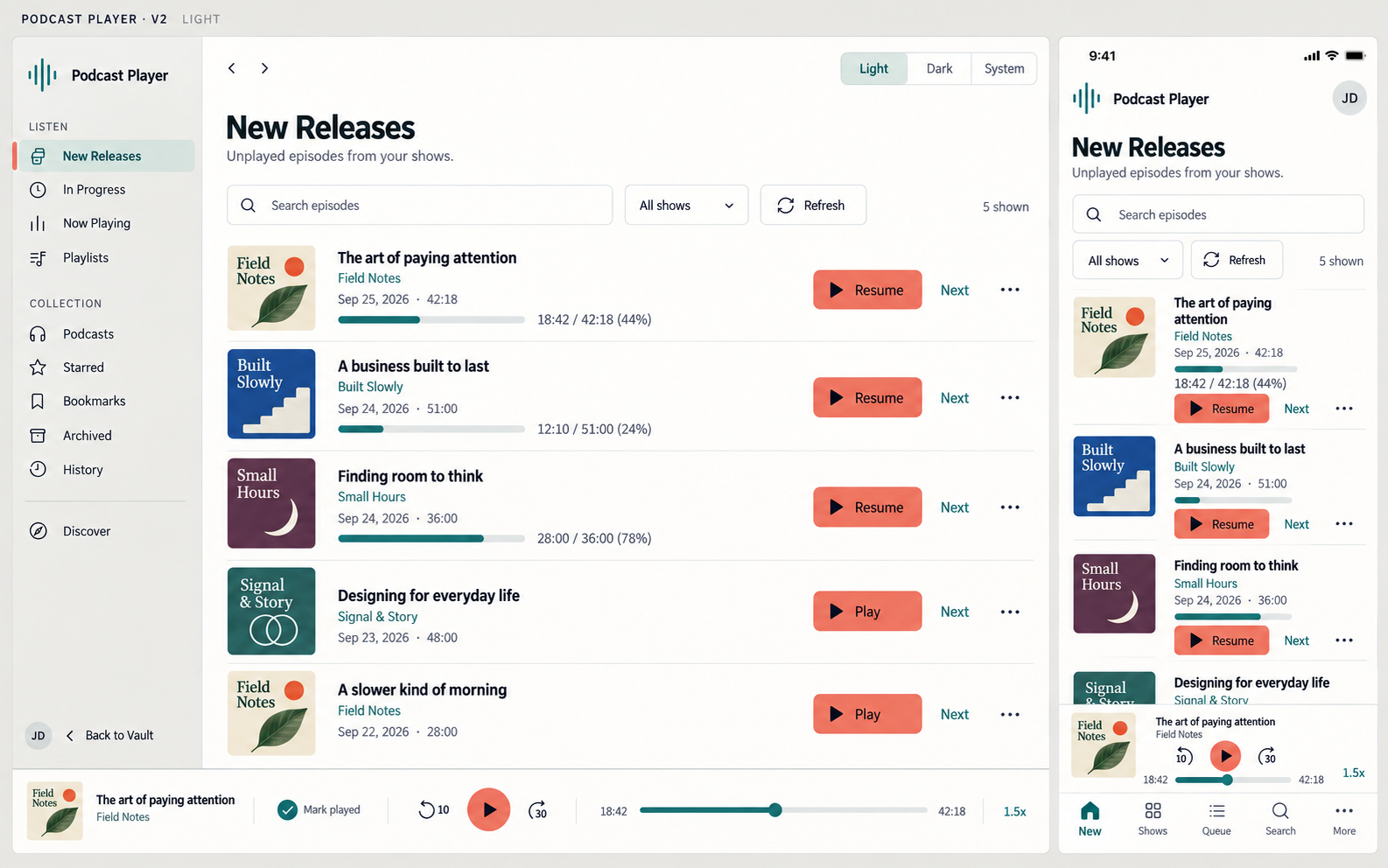
The visual direction favored clearer typography, quieter separators, consistent artwork, and a distinct playback accent. A functionality review then checked the proposed screens against the app: queue and playlists stay separate, episode actions remain reachable, and existing counts retain their meaning.
The final design brief also corrected mobile navigation labels and documented where the images differed from the intended behavior. That is the value of reviewing AI-generated design work: attractive concepts become specific, buildable decisions.
NexSolvo’s work spans customer-facing websites, internal tools, and product interfaces. Utah Road Trip Rentals shows a local website connected to booking and admin workflows. LupaLayer shows experience helping developers compare Figma designs with live interfaces.
These projects demonstrate relevant capabilities. The AI-assisted process for your project depends on the brief, available assets, and tools that fit the work. NexSolvo serves Northern Utah businesses and remote teams.
Common design and redesign questions
Can you improve an existing site or app?
Yes. Start by reviewing the current experience and codebase. A focused page or workflow improvement may be enough; the review helps establish scope.
Will the design match our brand?
The brief should include your logo, colors, typography, voice, and examples of what fits. Review generated directions against those choices and refine inconsistencies before implementation.
Does this include development?
It can. Agree whether the deliverable is a design direction, prototype, or working implementation. Hosting, ongoing updates, new backend features, and content migration belong in the scope when required.
Which AI design tools should we use?
Choose around the deliverable and existing workflow. For examples of current capabilities, Figma describes AI-assisted layout and design editing, while v0 offers visual interface refinement. These are examples, not requirements for working with NexSolvo.
What if the design looks finished but the app is not?
Review the behavior behind the interface. Our AI prototype-to-production guide explains what to check before real users depend on it.